
GA4 is a capable tool sitting on top of whatever tracking you feed it. If the tracking plan is vague, the reports are vague too, and no interface upgrade fixes that.
When teams tell us GA4 “does not work”, the investigation almost always ends in the same place: events firing twice, purchases without values, traffic sources labelled direct, and nobody able to say who decided what a conversion is. The tool gets blamed for a planning failure. A tracking plan is the document that prevents all of it, and most businesses either never wrote one or wrote one three platforms ago.
The tool is rarely the problem
Analytics platforms are often adopted like appliances: installed, switched on, expected to work. But analytics is not an appliance. It is a measurement instrument, and instruments need calibration. GA4, Google Tag Manager, consent mode, server-side tagging and the warehouse all behave exactly as configured. The question is whether the configuration reflects deliberate decisions about the business.
Symptoms of a missing plan are easy to recognise. Reported revenue never matches finance. Channel performance swings wildly between platforms. Tests conclude nothing because the goalposts move. Each symptom gets treated as a tooling issue, each fix adds another tag, and the measurement gets worse while everyone works hard. Planning breaks this cycle by deciding the rules once, in writing.
GA4 will show you exactly what your tracking plan deserves: garbage in, gospel out.
What a tracking plan contains
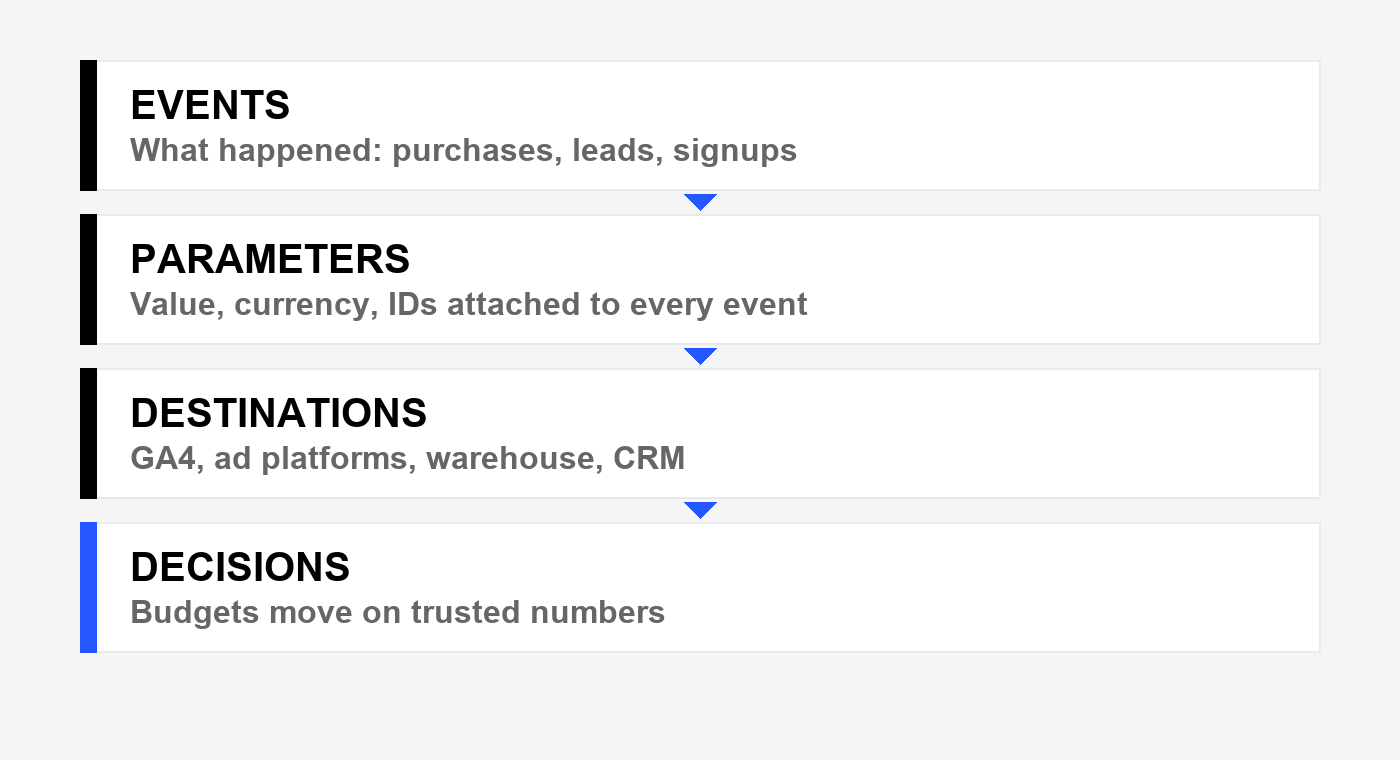
A good plan fits on a few pages and answers four questions in order. Skip a layer and every layer above it wobbles.
1. Events: what counts as happening
Every meaningful action gets a name, a trigger and an owner: purchases, qualified leads, signups, key page views. If two teams define “lead” differently, the plan picks one definition and retires the other. Fewer, sharper events beat long lists of maybe-useful ones.
2. Parameters: what travels with each event
Value, currency, transaction IDs, product details, lead scores. Parameters are what turn a counted event into usable evidence. Revenue without currency, or purchases without IDs for deduplication, is decoration. This layer is where finance reconciliation is won or lost.
3. Destinations: where the data goes
GA4, ad platforms, the warehouse, the CRM. Each destination needs the same events described the same way, plus its own requirements like consent handling and enhanced conversions. The plan maps every flow so nothing is tagged twice or lost between systems.
4. Decisions: what the data is allowed to change
The most skipped layer. The plan states which metrics move budgets, what evidence a test needs, and how often numbers are reviewed. Measurement without decision rights is reporting theatre. Write down who acts on what, or the plan gathers dust.
How plans fail in practice
- Duplicate events. The same purchase fires from the website and the confirmation page, or from both client and server tagging. Revenue doubles and nobody notices for months.
- Missing values. Conversions tracked without revenue or with the wrong currency. Optimisation algorithms then optimise for volume instead of value.
- Consent blindness. Tracking installed without a consent strategy, so an unknown share of users simply vanish from reports in privacy-strict regions.
- No owner. Tags added by whoever needed them, never reviewed, never removed. The container becomes an archaeological dig.
An audit finds these in days. Fixing them takes weeks. Living with them costs every budget decision you make. That is the economics of the tracking plan: cheap to write, expensive to skip. Our measurement work starts here for that reason.
Governance keeps it working
A plan is a living document. New pages, new campaigns and new tools each threaten it, so governance matters more than the initial build. Name one owner. Require every new tag to reference a plan entry. Review the container quarterly and delete with enthusiasm. Boring discipline, compounding returns.
If your reports feel untrustworthy, start with an audit, not a new tool. Read about privacy-conscious measurement, see selected work, or ask us to review your setup.
FAQs
Is GA4 itself any good?
Yes. GA4 is flexible and powerful once configured deliberately. Almost every complaint we investigate traces back to events, parameters or consent handling, not the platform. Judge the tool only after the tracking plan is sound.
Do we need Google Tag Manager?
In most cases, yes. GTM gives marketing and analytics teams a governed way to deploy and version tags without waiting on development sprints. Hardcoded tags work for tiny sites, but they do not scale and they are rarely documented. See our GA4 and Tag Manager service.
Should we audit before rebuilding?
Always. An audit tells you what is broken, what is merely ugly, and what is secretly load-bearing. Rebuilding without one risks deleting the one tag that actually works. A focused audit takes days and pays for itself in avoided mistakes.
What about server-side tagging?
Server-side tagging improves data resilience against ad blockers and browser restrictions, and it centralises control. It is worth it once volume justifies the infrastructure. For smaller sites, a clean client-side setup with proper consent handling comes first.
How do we handle consent and privacy?
Consent mode, transparent banners and regional behaviour need to be part of the plan, not bolted on. Decide what fires in each consent state, document it, and verify it. Privacy-strict traffic is growing, so planning for missing data beats pretending it does not exist.
Why does reported revenue never match finance?
Usually a mix of duplicate events, missing refunds and cancellations, timezone and currency mismatches, and different definitions of a sale. Reconciliation is a tracking plan deliverable: same events, same IDs, same rules, checked monthly against finance figures.
Who should own tracking in our team?
One named owner with authority to approve or reject tag requests, ideally sitting between marketing and engineering. Shared ownership means no ownership, and the container fills with mystery tags within a year.
How often should we review the setup?
Quarterly for the container and event inventory, monthly for revenue reconciliation, and immediately after any site rebuild, checkout change or new platform launch. Small regular reviews beat heroic annual rebuilds.
Leave a Reply